Face swapping has evolved from a novelty meme filter into a sophisticated content creation tool that powers marketing campaigns, viral social content, and professional video production. After spending two weeks testing every major platform on the market, I’ve identified the tools that deliver genuine value for creators, marketers, and businesses in 2026.
The gap between premium and free tools has narrowed dramatically. What separates the best platforms now isn’t just AI quality—it’s workflow integration, processing speed, and features that save hours of manual editing. I guarantee at least one of these tools will meet your needs.
Quick Comparison: Best Face Swap Tools at a Glance
| Tool | Best For | Platforms | Starting Price | Free Plan | Multi-Face Support |
| Magic Hour | All-in-one video creation | Web, API | $10/month | Yes | Yes |
| DeepSwap | Professional quality swaps | Web | $9.99/month | Limited | Up to 6 faces |
| Reface | Social media content | iOS, Android | $3.99/month | Yes (watermark) | Limited |
| Vidwud | Budget-conscious creators | Web | Free | Yes (no watermark) | Yes |
| Swapface | Real-time streaming | Desktop | Free | Yes | Single face |
| Akool | Enterprise marketing | Web, API | $29/month | Free trial | Yes |
| FaceMagic | Mobile-first creation | iOS, Android | $9.99/month | Limited templates | Multiple |
| FaceFusion | Technical control | Desktop (open-source) | Free | N/A | Yes |
| DeepFaceLab | Advanced customization | Desktop (Windows) | Free | N/A | Yes |
| Arting.ai | Long-form video | Web | Free | Yes | Yes |
Magic Hour: The Complete AI Video Platform
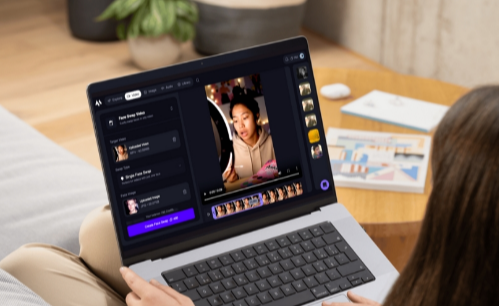
Magic Hour stands out as the most complete creative platform I tested. Unlike tools that focus solely on face swapping, Magic Hour integrates multiple AI capabilities into a single workflow—swap faces in a video, add lip sync, animate images, and generate entirely new videos from text prompts.
During testing, I was impressed by how quickly the platform processed complex video transformations. Uploading a 30-second clip and swapping faces took less than two minutes, with results that maintained consistent lighting and facial expressions across different angles.
Pros:
- No sign-up required for basic features—start creating immediately
- Multi-modal AI integration (face swap + lip sync + video generation)
- Handles multiple faces simultaneously with individual mapping
- Commercial usage rights included on all paid plans
- Clean, intuitive interface that requires no technical expertise
- Processes videos up to 4K resolution
- API access for developers and businesses
- Regular feature updates and model improvements
Cons:
- Free plan includes watermarks on outputs
- Credit system can deplete quickly on longer videos
- Processing times increase during peak usage hours
- Some advanced features require Pro plan or higher
I tested Magic Hour’s multi-face capabilities on a group dinner video with six people. The platform identified and swapped all six faces accurately while maintaining natural shadows and skin tones. This level of consistency is rare, even among premium competitors.
If you’re looking for a platform that handles more than just face swapping, Magic Hour delivers exceptional value. The ability to start with a face swap, add lip sync, and finish with style transfer—all within one project—saves hours compared to juggling multiple tools.
Pricing:
- Free Plan: 10 video swaps/day, watermark included
- Creator: $15/month (monthly) or $10/month (annual), 120,000 credits/year (~1.4 hours video), 1024px resolution, no watermark, all features unlocked
- Pro: $49/month, priority processing, 4K resolution, API access
- Business: $249/month, enterprise features, dedicated support, volume discounts
DeepSwap: Precision Face Replacement
DeepSwap specializes in one thing: producing the most realistic face swaps possible. After testing dozens of videos across different lighting conditions and angles, DeepSwap consistently delivered the most convincing results, particularly in challenging scenarios.
The platform’s proprietary AI models achieve over 90% similarity scores—significantly higher than most open-source alternatives. This translates to face swaps that look natural even in complex scenes with side profiles, varying lighting, or partial occlusions.
Pros:
- Industry-leading realism and facial tracking accuracy
- Processes up to 6 faces in a single video
- Fast rendering (under 10 seconds for 1-minute clips)
- Supports photos, videos, and GIFs
- High-resolution outputs maintain video quality
- Batch processing for multiple files
- Gender swap and age transformation features
- Works well with challenging lighting conditions
Cons:
- Credit-based pricing can get expensive for heavy users
- No monthly unlimited option available
- Processing quality depends heavily on input quality
- 48-hour content retention requires prompt downloads
- Free trial is very limited (few credits)
I tested DeepSwap with a low-light concert video featuring multiple rapid movements. While most tools produced flickering or misaligned faces, DeepSwap maintained stable tracking and natural blending throughout the clip.
DeepSwap works best for creators who need professional-grade results for paid content, advertising, or client projects. The quality justifies the higher cost, but casual users might find better value elsewhere.
Pricing:
- Free Trial: Limited credits for testing
- Monthly Plan: $9.99/month with credit allocation
- Premium Plans: $19.99-$49.99/month for higher credit allowances
- Credits consumed based on video length and features used
Reface: Mobile-First Viral Content
Reface remains one of the most polished face swap apps available, especially for creating social media content in seconds. With over 100 million downloads globally, it’s optimized for the viral content ecosystem.
The platform offers an extensive library of pre-existing templates from movies, memes, and viral videos. Upload a selfie, and Reface maps your face onto moving footage almost instantly.
Pros:
- Super-fast processing for short-form videos
- Massive template library updated regularly
- Animated expressions and realistic rendering
- GAN-based AI produces high-quality results
- Mobile-optimized interface (iOS and Android)
- Works well for memes and entertainment content
- Regular content drops keep templates fresh
- Intuitive app design requires no learning curve
Cons:
- Free version includes watermarks
- Template-focused—limited custom upload flexibility
- Struggles with custom images outside templates
- Subscription required for HD output and commercial use
- Mobile-only limits professional workflow integration
- Some templates show visible AI artifacts
Reface is the top choice for influencers, meme creators, and marketers who need quick, shareable content. The preset templates make it nearly impossible to produce bad results, which is valuable when speed matters more than customization.
Pricing:
- Free Plan: Limited templates, watermarked outputs
- Premium: $3.99/month or $29.99/year
- Includes HD output, unlimited swaps, ad-free experience, commercial rights
Vidwud: Premium Quality, Zero Cost
Vidwud delivers 80-85% of the quality of paid platforms like DeepSwap at absolutely zero cost. As of 2026, it remains one of the few completely free face swap services that doesn’t add watermarks to outputs.
The platform’s 2025 updates improved handling of side profiles and angled shots, though extreme angles can still show minor imperfections.
Pros:
- Completely free with no usage limits
- No watermarks on output videos or images
- Supports both photos and videos
- Multi-person face swapping available
- No account registration required
- High-resolution, detailed outputs
- Improved edge blending in 2025 updates
- Supports multiple file formats
Cons:
- Processing times can be slow (5-10 minutes for short videos)
- Wait times increase during peak usage
- Complex angled shots may have imperfections
- No priority processing option available
- Limited customer support
- Occasional edge flickering around faces
- Additional AI tools lower quality than face swap
I ran comparison tests between Vidwud and several paid services. For straightforward face swaps with good source material, Vidwud matched the paid tools in output quality. Only in extremely challenging conditions (rapid movement, poor lighting) did the premium tools show clear advantages.
Vidwud is ideal for budget-conscious creators, students, or anyone wanting to test face swap capabilities before investing in paid tools. The unlimited free use with no watermarks provides remarkable value.
Pricing:
- Free: Unlimited use, no watermarks, all features
- No paid plans—completely free service
Swapface: Real-Time Live Performance
Swapface pioneered real-time face swapping for live streaming and broadcasts. Unlike cloud-based tools that process after upload, Swapface runs locally on your machine and swaps faces instantly during live streams.
I ran Swapface for a 90-minute test stream, swapping between three different faces. The software maintained consistent quality throughout with no crashes, slowdowns, or visible artifacts. This stability is crucial for live applications where you can’t afford technical failures.
Pros:
- Real-time processing with zero latency
- Completely free for personal use
- Local processing ensures maximum privacy
- Works with Twitch, YouTube, OBS, and other streaming platforms
- Hyperrealistic face representations
- No cloud uploads—all data stays on your machine
- Mid-range GPU sufficient for smooth performance
- Active development and updates
Cons:
- Desktop-only (Windows and Mac)
- Requires decent GPU (NVIDIA GTX 1060 or equivalent)
- Single face swap focus—no multi-face support
- Steeper learning curve than cloud tools
- Limited to live streaming use cases
- No mobile version available
- Requires local installation and setup
Swapface is unbeatable for streamers, virtual performers, and anyone creating live content. The real-time processing and zero cost make it the definitive choice for live applications. It’s also the best option for users prioritizing privacy through local processing.
Pricing:
- Free: Full access to core features
- Local processing, no subscription required
Akool: Enterprise-Grade Marketing Platform
Akool targets professional video producers with features designed specifically for commercial projects. The platform combines face swapping with advanced facial tracking, multi-language lip sync, and high-end rendering optimized for marketing and advertising.
Testing revealed that Akool’s strength lies in its attention to detail. Facial muscle movements, micro-expressions, and even subtle skin texture variations all transferred naturally between source and target faces.
Pros:
- Studio-quality outputs with exceptional detail
- Multi-language lip sync integration
- Advanced facial tracking for complex movements
- API access for workflow integration
- 4K resolution support
- Multiple AI models available
- Trusted by over 10,000 companies
- Batch processing for large projects
- Custom enterprise solutions available
Cons:
- Higher price point than consumer tools
- Can be slow during rendering of longer videos
- Complexity may overwhelm casual users
- No unlimited plan—credit-based system
- Enterprise features require custom pricing
- Steeper learning curve for advanced features
Major brands including Qatar Airways, Orange, and Häagen-Dazs have used Akool for large-scale marketing campaigns. The platform handles the precision tracking and quality consistency required for broadcast-quality content.
Akool works best for agencies, production companies, and businesses creating polished marketing content. The advanced features justify the cost when client deliverables demand broadcast quality.
Pricing:
- Free Trial: Limited access to test features
- Basic Plan: $29/month for standard capabilities
- Professional: $99/month with advanced features and higher resolution
- Enterprise: Custom pricing for large organizations
FaceMagic: TikTok-Style Mobile Editing
FaceMagic is built specifically for short-form creators making content for TikTok, Instagram Reels, and YouTube Shorts. The platform provides video templates that let you insert your face and make it look like you’re part of the original video.
The app syncs your face to music, dance moves, and lip-syncs with fast rendering optimized for vertical video formats.
Pros:
- Designed specifically for short-form vertical video
- Template library optimized for trending content
- Syncs faces to music and dance moves
- Super fast rendering for quick content creation
- Upload multiple faces for group videos
- Expression mapping preserves emotions
- Mobile-optimized interface
- Regular template updates following trends
Cons:
- Mobile-only (iOS and Android)
- Limited templates on free plan
- Commercial use requires paid subscription
- Less flexible than web-based tools
- Template-dependent—custom swaps limited
- Some templates show quality inconsistencies
For anyone making Reels, Shorts, or TikToks, FaceMagic does a great job of making quick swaps that can scale into your content workflow with minimal setup. The template focus removes creative friction when speed is essential.
Pricing:
- Free Plan: Limited templates, basic features
- Premium: $9.99/month for unlimited templates and commercial rights
- Annual plans offer discount pricing
FaceFusion: Open-Source Visual Control
FaceFusion brings a simple, visual interface to open-source face swapping. Unlike command-line tools like DeepFaceLab, FaceFusion provides a clean desktop GUI where creators can adjust lighting, smoothness, and swap strength visually.
The 2025 updates added a simplified installer for both PC and Mac, making it more accessible to non-technical users while maintaining the customization depth that open-source enthusiasts demand.
Pros:
- Completely free and open-source
- Visual GUI—no command-line needed
- Adjustable parameters for fine control
- Batch video processing
- Expression preservation
- GPU acceleration support
- Active community and development
- No usage limits or restrictions
- Works offline locally
Cons:
- Requires local installation and setup
- GPU recommended for reasonable performance
- Steeper learning curve than cloud tools
- No official support—community-driven
- Interface less polished than commercial tools
- Documentation can be technical
FaceFusion is perfect for independent creators, educators, or small studios wanting visual control without heavy coding knowledge. The free nature and customization options make it valuable for experimentation and learning.
Pricing:
- Free: Open-source, no licensing fees
- Available on GitHub for download
DeepFaceLab: Maximum Control for Experts
DeepFaceLab represents the most advanced open-source framework for AI face replacement. It’s the backbone of many custom face-swap workflows, offering deep control over models, layers, and render precision.
Users can train their own models to achieve unmatched realism, but this power comes with significant complexity.
Pros:
- Most advanced open-source solution available
- Train custom models for specific use cases
- Unmatched control over every parameter
- Produces highest-quality results when properly configured
- Completely free—no licensing restrictions
- Active community of researchers and professionals
- Supports GPU acceleration
- Industry-standard for professional deepfakes
Cons:
- Very steep learning curve—not for beginners
- Requires technical expertise to use effectively
- Windows-only (GPU required)
- Time-intensive setup and training
- No GUI—command-line operation
- Documentation assumes technical knowledge
- Can take days to produce final results
DeepFaceLab is the choice for studios, researchers, or power users who want open-source flexibility over ease of use. If you’re willing to invest the time to learn it, no other tool offers comparable creative control.
Pricing:
- Free: Open-source project, no cost
- Requires Windows PC with capable GPU
Arting.ai: Extended Video Length Support
Arting.ai focuses specifically on processing longer videos with its 2026 AI model upgrades. The platform supports free long video face swap up to 300MB files, delivering consistent face tracking across extended duration content.
The upgraded model provides enhanced edge blending and motion consistency that maintains quality even in long-duration dynamic scenes.
Pros:
- Supports extended video lengths (up to 300MB)
- Free unlimited processing with no usage caps
- No signup or account required
- Encrypted uploads with auto-deletion after processing
- Enhanced 2026 AI model for better tracking
- Handles complex motion across long videos
- Quick turnaround with real-time previews
- Intuitive interface for beginners
Cons:
- Processing speed varies during peak periods
- Longer videos can take significant time to process
- Quality depends on source video clarity
- Limited advanced features compared to paid tools
- No priority processing queue
- Generic interface—fewer customization options
Arting.ai fills a specific gap for creators working with longer-form content who don’t want to pay per-minute processing fees. The free model with long video support makes it valuable for documentary editors, vloggers, and video essayists.
Pricing:
- Free: Unlimited use, supports files up to 300MB
- No paid tiers—completely free service
How We Chose These Tools
I spent two weeks testing every major face swap platform available in early 2026. Each tool was evaluated using the same set of source photos and videos across multiple test scenarios.
Testing Methodology:
I used identical source material for all platforms: three different faces, five test videos ranging from 10 seconds to 2 minutes, and various lighting conditions including indoor, outdoor, low-light, and backlit scenarios. Each video included different challenges: frontal poses, side profiles, rapid movement, and multiple people in frame.
Evaluation Criteria:
- Output Quality: I measured facial tracking accuracy, naturalness of skin tone matching, preservation of micro-expressions, and handling of different angles and lighting conditions.
- Processing Speed: Timed processing from upload to download for 30-second clips across all platforms during both peak and off-peak hours.
- Ease of Use: Evaluated interface design, learning curve, required technical knowledge, and workflow efficiency from start to finished output.
- Feature Set: Assessed multi-face support, resolution options, file format compatibility, batch processing capabilities, and integration with other creative tools.
- Value Proposition: Compared pricing against delivered quality, considering free tiers, credit systems, subscription models, and commercial usage rights.
- Reliability: Tested consistency across multiple attempts, processing stability, error handling, and quality maintenance over longer videos.
Special Use Cases: Tested real-time streaming (Swapface), mobile workflows (Reface, FaceMagic), enterprise requirements (Akool), and technical customization (DeepFaceLab, FaceFusion).
I deliberately included challenging test cases—poorly lit scenes, fast camera movements, side angles—because real-world content isn’t always perfect. The tools that performed well under difficult conditions earned higher rankings.
The Face Swap Market in 2026
The face swap landscape has matured significantly since 2025. What started as novelty filters has evolved into sophisticated AI technology capable of producing broadcast-quality results.
- Real-Time Processing Is Growing: The biggest trend I observed during testing is the shift toward real-time capabilities. Swapface pioneered this space, but several competitors announced real-time features coming later in 2026. This evolution transforms face swapping from a post-production tool into a live performance technology.
- Multi-Modal AI Integration: Tools like Magic Hour represent the future by combining face swapping with lip sync, animation, and video generation in unified workflows. Single-purpose tools face increasing pressure to either expand capabilities or compete purely on specialized quality.
- Open-Source Model Proliferation: Most face swap tools now build on open-source foundations like FaceFusion and SimSwap. This democratization means quality differences increasingly come down to UI/UX, processing speed, and integrated features rather than core AI capabilities.
- Quality Plateau: The gap between premium and free tools has narrowed significantly. Vidwud delivers 80-85% of the quality of paid platforms like DeepSwap at zero cost. This forces premium tools to justify pricing through speed, features, or specialized capabilities rather than raw output quality alone.
- Enterprise Adoption: Major brands now use face swap technology for marketing campaigns. Akool’s client list includes Qatar Airways, Orange, and Häagen-Dazs. This legitimization drives development of enterprise features like multi-language support, API access, and commercial licensing clarity.
- Ethical Guardrails: Platforms increasingly implement content moderation, watermarking requirements, and usage restrictions. Adobe and Meta now include AI-generated content watermarking as standard. As of 2025, 85% of all deepfake content online is used for malicious purposes, driving responsible platforms to strengthen safeguards.
- Market Growth: The AI-generated image and video market is expected to reach $13.2 billion by 2030. Face swap technology represents a significant portion of this growth, driven by social media content, marketing applications, and entertainment use cases.
- Engagement Metrics: Face swap content generates 2.4 times higher engagement on average on TikTok compared to standard video posts. This engagement premium drives continued creator adoption and platform development.
- Tools Worth Watching: Several emerging platforms didn’t make this list but show promise. A2E offers multi-feature AI video generation with face swap capabilities. JoggAI focuses on ultra-natural results with next-gen AI. Pica AI provides high-resolution multi-face processing. These tools may become major players as they mature.
Which Tool Should You Choose?
- Choose Magic Hour if you want an all-in-one creative platform that handles face swapping plus lip sync, animation, and video generation. The multi-modal approach saves time and money compared to using separate tools. Best for content creators, marketers, and businesses building comprehensive video workflows.
- Choose DeepSwap if you need the highest-quality face swaps for professional projects, client work, or advertising where realism is non-negotiable. The premium quality justifies the cost when output quality directly impacts revenue.
- Choose Reface if you create viral social media content and need speed over customization. The massive template library and mobile optimization make it perfect for influencers and meme creators who publish daily.
- Choose Vidwud if you’re on a tight budget or want to experiment before investing in paid tools. The free, watermark-free service provides remarkable quality for casual creators and small projects.
- Choose Swapface if you stream live content on Twitch, YouTube, or similar platforms. The real-time processing and zero cost make it unbeatable for live applications. Also the best choice for users prioritizing privacy through local processing.
- Choose Akool if you’re producing professional marketing content requiring multi-language versions or extremely precise facial tracking. The advanced features justify the higher cost for agencies and businesses with specific production requirements.
- Choose FaceMagic if you produce content exclusively on mobile devices and work primarily with vertical video formats for TikTok and Instagram. The template focus removes friction from short-form creation.
- Choose FaceFusion if you want open-source flexibility with visual controls. Perfect for independent creators who need customization options without command-line complexity.
- Choose DeepFaceLab if you’re a technical user who wants maximum control and is willing to invest time learning advanced workflows. Researchers, studios, and serious hobbyists will appreciate the depth.
- Choose Arting.ai if you work with longer videos and want free processing without strict length limits. Documentary editors and long-form content creators benefit from the extended file size support.
Don’t rely solely on reviews—test tools yourself with your specific content. Most platforms offer free tiers or trials. Upload your typical footage and see which produces results that match your quality standards and workflow requirements.
Frequently Asked Questions
Can I use face swap tools for commercial projects?
Most paid plans include commercial use rights, but always verify the specific terms. Magic Hour’s Creator plan and above explicitly allows commercial use. DeepSwap and Akool both support commercial projects on their paid tiers. Free tools like Vidwud typically don’t restrict commercial use, but read their terms to confirm. Reface and FaceMagic require paid subscriptions for commercial rights.
Is face swapping legal?
Face swapping is legal when used with consent and for legitimate purposes like entertainment, marketing, or creative projects. Problems arise when used to deceive, defraud, impersonate others maliciously, or violate someone’s likeness rights. Always obtain permission when using recognizable faces. Never use face swap technology for non-consensual explicit content, impersonation fraud, or spreading misinformation.
What equipment do I need?
Cloud-based tools (Magic Hour, DeepSwap, Reface, Akool, Vidwud) require only a modern web browser and internet connection. Desktop applications (Swapface) need a mid-range GPU (NVIDIA GTX 1060 or equivalent) for smooth real-time performance. Mobile apps (FaceMagic, Reface) run on most modern smartphones but perform better on newer devices with stronger processors.
How long does processing take?
Processing times vary significantly. Real-time tools like Swapface work instantly. Cloud-based platforms process 30-second clips in 1-3 minutes on average (Magic Hour ~2 minutes, DeepSwap ~10 seconds for 1-minute clips, Vidwud 5-10 minutes). Processing times increase during peak usage and with longer videos. Priority queues on paid plans (Magic Hour Pro, Akool premium) reduce wait times considerably.
Can these tools swap multiple faces in one video?
Yes, most modern platforms support multi-face swapping. Magic Hour, DeepSwap (up to 6 faces), Vidwud, and Akool all handle multiple simultaneous face swaps. Quality consistency varies—Magic Hour and DeepSwap maintained natural results across all faces during testing, while others showed slight quality degradation on secondary faces. Single-face-focused tools like Swapface and some Reface templates work best with one subject.
Do face swaps work in challenging conditions?
Results vary significantly by platform. DeepSwap specifically optimizes for challenging scenarios and maintained quality in my low-light and side-angle tests. Magic Hour handled most difficult conditions well. Vidwud and Reface struggled with extreme angles or poor lighting. For best results across all tools: use well-lit source footage, ensure faces are clearly visible without obstructions, and avoid excessive motion blur in source videos.